Effective YouTube keyword research can make the difference between your video being discovered or lost in the ocean of uploads. With the right tool, you can spot trending topics, assess competition, and tailor your content to boost visibility and growth. I prefer Keyword Tool Dominator because it pulls real-time YouTube autocomplete keywords rather than estimated data.
To help you out, I have compiled a list of the best YouTube Research Tools, what they’re best at, and how much they cost, so you can choose the one that’s best for you.
Top 9 YouTube Keyword Research Tools: Quick Overview (2026)
To save you time on your search, we have compiled the top 9 YouTube Research Tools, along with their pricing and what each is best at. Have a look below:
| Tool | Plans / Pricing (if known) | Best For/Strengths |
|---|---|---|
| Keyword Tool Dominator | Minimal access on the free version. Pricing varies as per plan | Creators seeking quick lists of keyword ideas via YouTube autocomplete without long-term commitment (FS Poster) |
| Semrush Keyword Analytics for YouTube | Part of Semrush; pricing depends on plan | Marketers who already use Semrush and need broad SEO + YouTube keyword research |
| Ahrefs YouTube Keyword Tool | Free version + full access via paid Ahrefs subscription | Creators needing accurate search volume, keyword difficulty, related-keyword ideas, and in-depth data (Ahrefs) |
| vidIQ | Freemium; paid plans start monthly (tiered) | YouTubers who want a YouTube-native toolkit: keyword scores, tag recommendations, competitor insights, and productivity tools. |
| TubeBuddy | Free version; paid plans start at $15/month | YouTubers who want easy-to-use keyword explorer + channel-optimization tools + tag suggestions |
| RyRob YouTube Keyword Tool | Free (limited keyword output for seed keyword) (RyRob) | Beginners or part-time creators wanting a free, simple tool to brainstorm video ideas |
| Google Trends (set to “YouTube search”) | Free | Great for spotting trending topics, seasonality, emerging interest, and comparative keyword growth |
| KeywordTool.io | Freemium- free keyword suggestions; paid version unlocks search volume, CPC, competition data | Creators who want long-tail keyword suggestions, multi-country & multi-language support, and flexible filtering |
| OutlierKit | Paid subscription (with free trial options) | Data-driven creators and small agencies who want low-competition high-RPM keywords, niche & trend insight, competitor gap analysis, and “outlier” video detection |
1. Semrush Keyword Analytics for YouTube
Semrush’s Keyword Analytics for YouTube is a data-driven tool designed for creators and marketers who want to understand demand, competition, and topic potential before publishing videos.

You enter a topic or keyword and select YouTube as the search engine. Semrush then provides estimated search volume, keyword difficulty, and related keyword ideas.
You can also analyse competitor channels to see which keywords their videos rank for, helping you identify underexplored topics and low-competition opportunities. This makes it helpful in planning video ideas that align with blog posts, landing pages, and full-funnel content strategies.
Here is the pricing structure of Semrush:
Starter Plan
- Monthly: $199/mo
- Annual (monthly equivalent): $165.17/mo
Pro+ Plan
- Monthly: $299/mo
- Annual (monthly equivalent): $248.17/mo
Advanced Plan
- Monthly: $549/mo
- Annual (monthly equivalent): $455.67/mo
2. Ahrefs (YouTube Keyword Tool / Explorer)
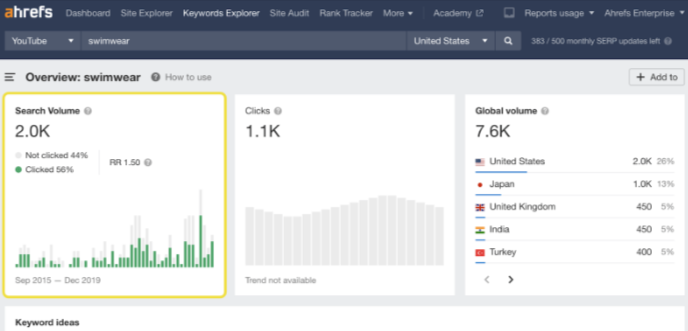
Ahrefs’ YouTube Keyword Tool is part of its broader Keywords Explorer and is designed to help creators understand what audiences search for on YouTube. It provides estimated YouTube search volume across more than 170 countries, keyword difficulty scores, related keyword ideas, and supporting metrics such as clicks and return rate. This makes it useful for creators who want data-backed validation before investing in long-form or evergreen video topics.
You enter a keyword and filter results for a YouTube search. Ahrefs then uses clickstream data and historical trend modelling to estimate demand, surface related queries, and assess competition. It also allows keywords to be saved in lists, making it easier to plan content clusters or long-term publishing strategies.
As of late 2025, Ahrefs’ YouTube keyword tool is under maintenance. This makes it a less dependable option for creators who rely heavily on YouTube-specific research at the moment.
Have a look at the pricing structure of Ahrefs:
Lite Plan
- Monthly: £99/mo
- Annual (monthly equivalent): £83/mo
Standard Plan
- Monthly: £199/mo
- Annual (monthly equivalent): £166/mo
Advanced Plan
- Monthly: £359/mo
- Annual (monthly equivalent): £299/mo
3. vidIQ
vidIQ is built specifically for YouTube creators and offers an in-platform browser extension and web app. It provides a keyword score that combines search volume and competition, tag suggestions, competitor channel analysis, and video performance monitoring.
vidIQ works through a browser extension and web dashboard that integrates with YouTube Studio. When you search for a keyword or analyse an existing video, vidIQ displays a keyword score that combines estimated search volume and competition.
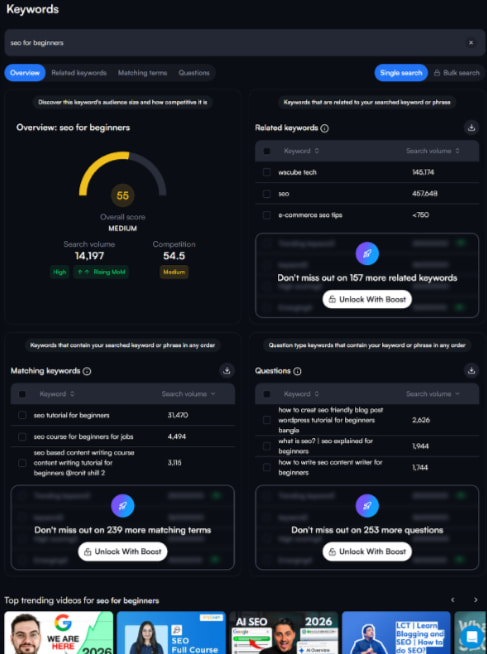
For example, when researching a term like “SEO for beginners,” vidIQ shows how often the keyword is searched and how competitive it is. It also suggests related keywords, tags, and alternative phrasing based on YouTube search behaviour.
The tool also analyses competitor videos and channels, showing which keywords they rank for and which tags they use. This allows creators to reverse-engineer successful videos rather than guessing topics.
At the bottom, it also shows the video rankings for the particular keyword.
vidIQ also surfaces trending topics, provides velocity alerts, and includes tools for A/B testing thumbnails and optimizing tags, making it an excellent day-to-day tool for creators focused on discoverability and channel growth.
One feature that I liked about vidIQ is its AI chat interface, which makes keyword research and other tasks way easier.
vidIQ has three plans (including free) as shown below:
Boost
- Monthly: £19/month
- Annual: £16.58/month
Coaching + Boost
- Monthly: £156/month
- Annual: £99/month
4. Tubebuddy
TubeBuddy integrates directly with YouTube and offers a Keyword Explorer that outputs search volume estimates, competition scores, and tag suggestions. It also includes thumbnail and title A/B tests, bulk metadata edits, and productivity tools.
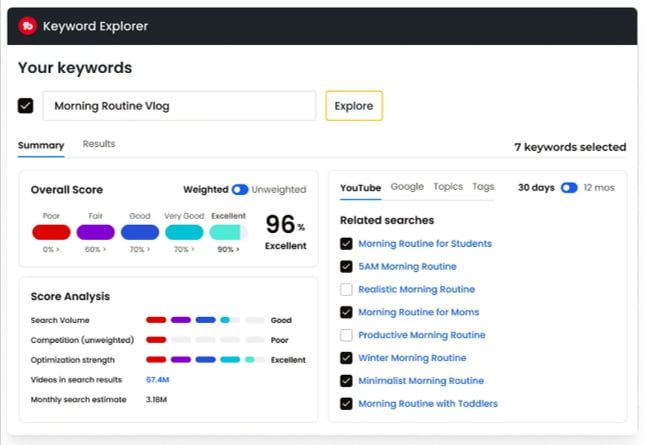
Best for: Independent creators or small channels who want optimization and publishing tools together.
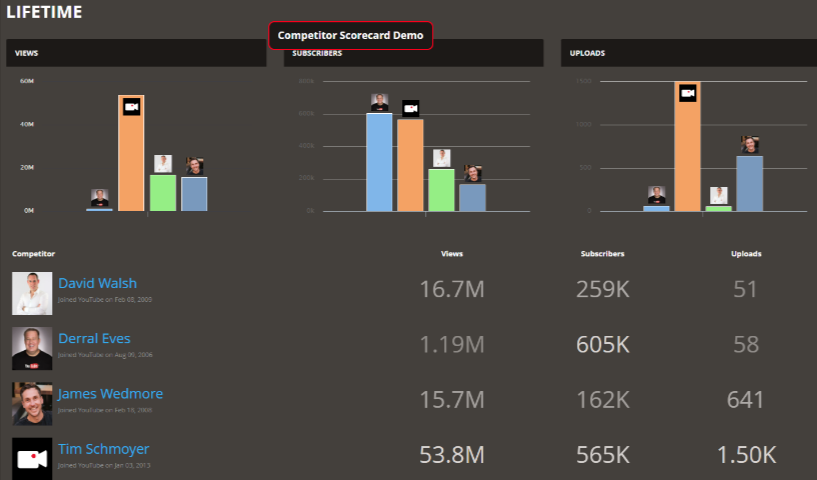
Tubebuddy also provides a competitor scorecard that compares your channel’s top 10 rivals and reveals insights such as views, subscribers, likes, engagement, and video performance. But since it is a Legend License feature, below is a screenshot of its demo scorecard.
Pricing Structure
Pro Plan
- Monthly Plan: £11.43/month ($15.00/month)
- Annual Plan: £9.15/month ($12.00/month)
Legend Plan
- Monthly Plan: £25.15/month ($32.99/month)
- Annual Plan: £20.12/month ($26.39/month)
Enterprise Plan
- Monthly Plan: Custom Pricing
- Annual Plan: Custom Pricing
5. Keyword Tool Dominator
Keyword Tool Dominator is a platform-specific keyword research tool designed for keyword discovery and ideation, rather than traditional SEO forecasting. It generates long-tail keyword ideas using live autocomplete data from platforms like YouTube, Google, Amazon, eBay, Etsy, and Walmart.
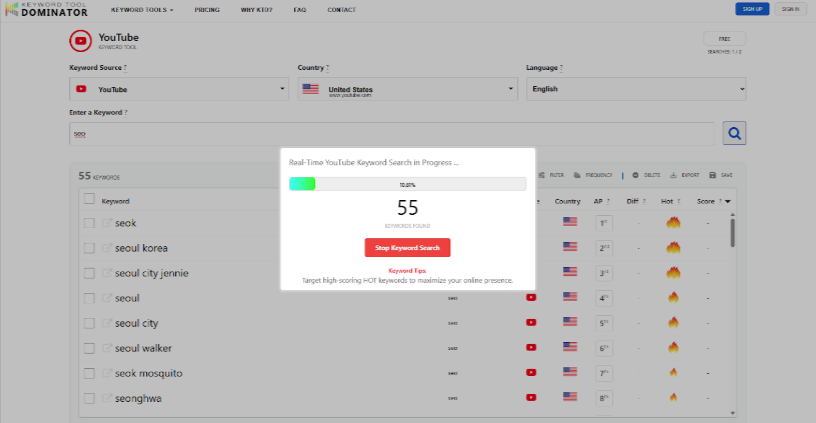
Instead of relying on estimated search volumes, the tool queries each platform’s autocomplete system exactly as a real user would. When you enter a seed keyword, it captures the phrases that appear in suggestions, reflecting how people are actually searching right now. For YouTube, this surfaces real, current viewer intent rather than pre-aggregated SEO datasets.
Each keyword is assigned a Keyword Score (0–100) based on how frequently it appears in autocomplete, with “Hot” keywords indicating stronger relative demand. These scores should be treated as prioritisation signals, not precise traffic estimates.
Because it does not provide search volume or competition metrics, Keyword Tool Dominator is best used for idea generation, trend validation, and phrasing accuracy, not deep competitive analysis.
For UK creators and sellers, it’s particularly valuable because autocomplete naturally reflects UK-specific wording and intent. Its one-time pricing also makes it appealing for creators who want fast keyword ideas without ongoing subscriptions.
Pricing Structure
Pro Plan
- 30 Days: $3
- 90 Days: $6
- 1 Year: $12
- Lifetime: $18
Plus Plan
- 30 Days: $5
- 90 Days: $9
- 1 Year: $19
- Lifetime: $34
Max Plan
- 30 Days: $7
- 90 Days: $14
- 1 Year: $27
- Lifetime: $44
6. RyRob
RyRob’s YouTube Keyword Research Tool helps creators discover what people are actually searching for on YouTube. It provides estimated monthly search volume and competition levels, making it easier to find long-tail keyword opportunities and optimize videos for better visibility and organic growth.
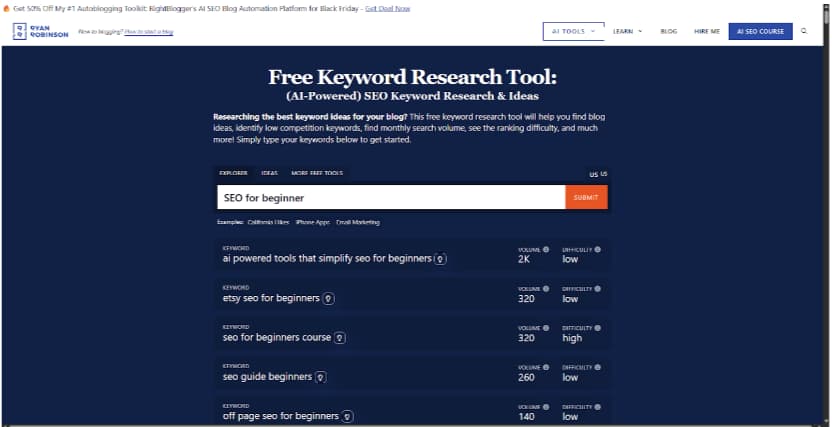
Although the tool is completely free to use, Ryan Robinson offers different pricing if you want to hire his agency for your work.
The pricing structure is as follows:
- Startup: $5,000/MO
- Growth: $10,000/MO
- High Volume: Custom Pricing
Source: RyRob
7. Google Trends
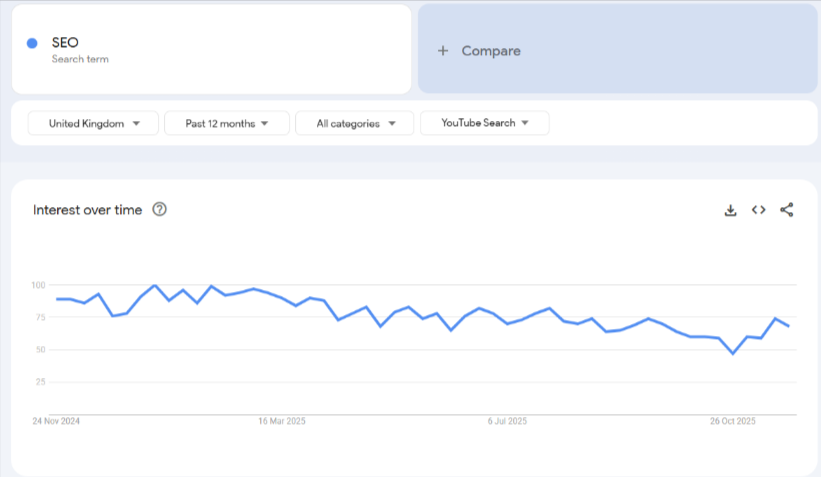
Switch Google Trends to “YouTube Search” to see relative interest over time. It doesn’t show absolute search volume, but it is perfect for timing content, spotting seasonal topics, and validating whether interest is rising or falling.
8. KeywordTool.io
KeywordTool.io is a keyword research platform designed to uncover long tail search queries using Google Autocomplete and suggestion data from multiple platforms, including YouTube, Bing, Amazon, Instagram, TikTok, and the App Stores. It focuses on showing how users actually phrase searches rather than relying only on advertiser-driven datasets.
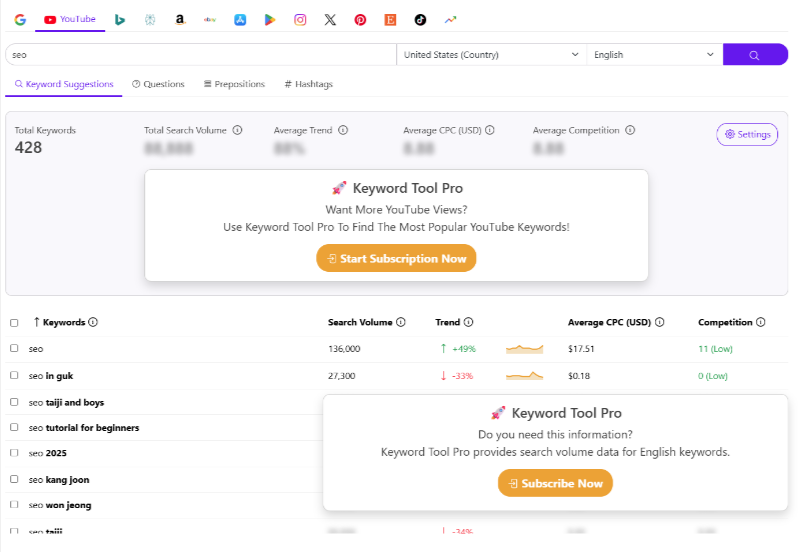
You start by entering a seed keyword, selecting the platform, country, and language. KeywordTool.io then pulls hundreds of autocomplete suggestions generated in real time based on past user searches. These suggestions reflect genuine search intent and are especially useful for content ideation, blog topics, video titles, and product descriptions.
Here is the pricing structure of KeywordTool.io
Monthly Plan
- Pro Basic: $89 / month
- Pro Plus: $99 / month
- Pro Business: $199 / month
Annual Plan
- Pro Basic: $69 / month
- Pro Plus: $79 / month
- Pro Business: $159 / month
9. OutlierKit
A more advanced, analytics-first product that detects “outlier” content, videos, or topics that over-performed relative to channel norms. It helps find low-competition, high-RPM keyword opportunities and niche gaps where you can gain traction.
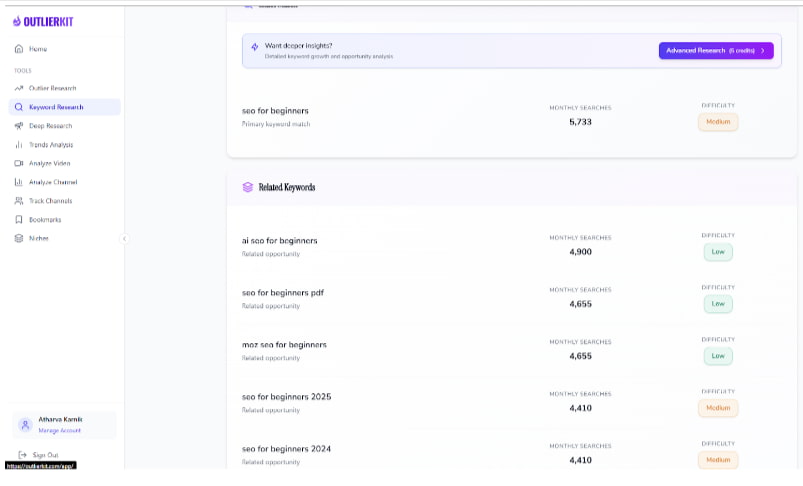
Outlier has several purchase plans as follows:
Hobby Plan
- Monthly: $19/month
- Annual: $12.4/month
- Lifetime: $249 one-time
Pro Plan
- Monthly: $39/month
- Annual: $24.9/month
- Lifetime: $549 one-time
Concierge
- Pricing: Starting at $299+/month
Also Checkout
Conclusion: Keyword Tool Dominator wins by pulling real-time YouTube autocomplete keywords
Keyword Tool Dominator is ideal for creators who want fast, accurate keyword ideas based on real YouTube autocomplete behaviour rather than delayed or advertiser-focused data. By surfacing live search phrases and prioritising them with a simple Keyword Score, it removes guesswork at the ideation stage.
FAQs
Yes, ChatGPT can help generate keyword ideas, long-tail variations, topic clusters, and content angles. However, it doesn’t provide real-time search volumes or competition metrics, so it’s best used alongside a dedicated YouTube keyword research tool.
To achieve a high or perfect SEO score, optimize your title, description, tags, thumbnail, and metadata with relevant keywords. Maintain strong audience retention, use an engaging thumbnail, add captions, and follow YouTube’s best practices for watch time and engagement.
The best overall tool depends on your goals and budget. For most creators, the RyRob YouTube Keyword Tool is the top choice due to its simplicity and free keyword suggestions. However, tools like vidIQ, TubeBuddy, and Ahrefs offer deeper analytics and optimization features.
Yes, YouTube tags still contribute to SEO, but only in a small, supportive way. They’re no longer a key ranking factor, as YouTube’s algorithm now relies far more on stronger signals to understand and rank your video’s content.
Currently, the most searched content on YouTube is ASMR, songs, DIY guides, trending news, and gaming